
 Add as preferred source
 Open in ChatGPT
 Open in Claude
An employer registered for PAYEPay As You Earn: the income tax an employer takes from each salary and pays to KRA every month.Open the PAYE calculator files a return every month, even in a month with no PAYE to declare. That return is a nil return[1]. It is due by the 9th of the following month, like any PAYE return[2], and a late one costs Ksh 10,000 even with no tax due[3]. After reading this you will know when to file one and how, step by step.
A nil return is for a month in which the business paid no salaries and deducted no PAYE. Take Wanjiku and Otieno's software company in Westlands: it registered for PAYE when it was set up, but the founders have not yet started drawing pay. Each month until they do, the company files a nil return.
If you paid any salaries that month, the full P10The employer's monthly PAYE return to KRA, filed and paid by the 9th of the next month.Prepare a P10 return is the return to file, even when no tax was deducted[2]. It also carries the housing levyThe Affordable Housing Levy: 1.5% of gross pay from the employee, matched by 1.5% from the employer.Open the housing levy calculator on those salaries[4] and the NITA levyThe National Industrial Training Authority's levy: Ksh 50 an employee a month, paid by the employer., which is worked out from the employees on the return[5].
- Log in to the iTax portalKRA's website for filing returns and paying tax.Open the iTax portal(opens in a new tab) with the business's KRA PINThe tax number KRA gives every taxpayer: a letter, nine digits and a letter, such as A012345678Z.Read about the PIN on KRA's website(opens in a new tab) and password.
- Open the Returns menu and choose File Nil Return[6].
- Under the tax obligation, choose Income Tax - PAYE, then Next. The list shows only the obligations the PIN is registered for, such as Income Tax - Company or Income Tax - Turnover TaxTurnover tax: 1.5% of a business's sales, with no costs taken off, for yearly sales over Ksh 1,000,000 and up to Ksh 25,000,000.Compare turnover tax with income tax beside it.
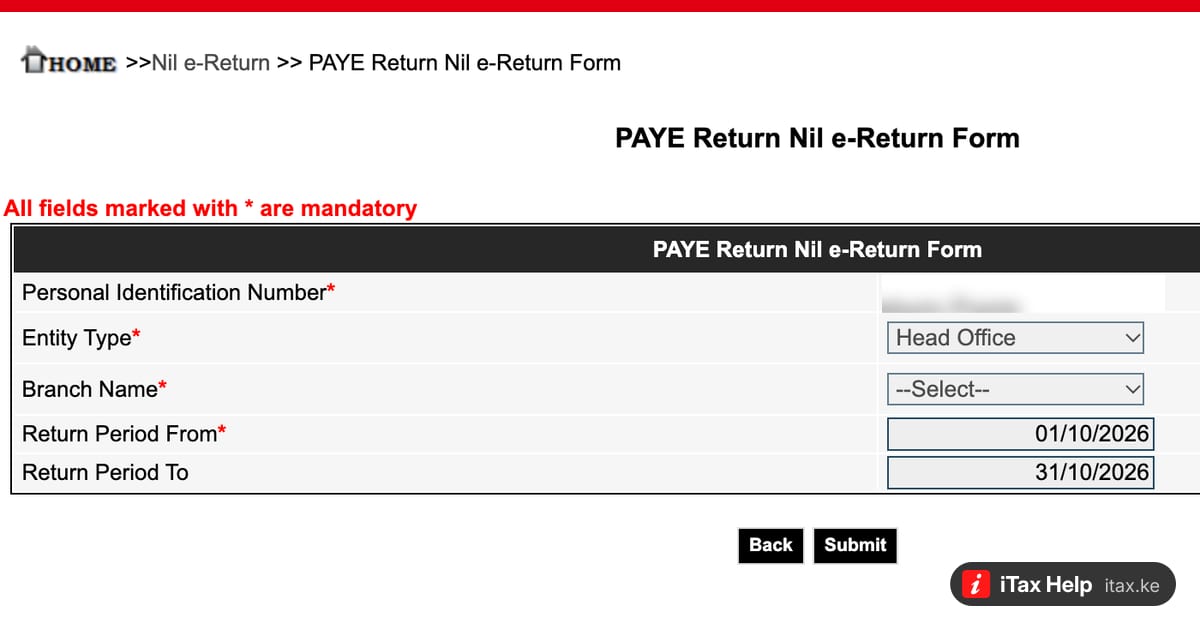
- The PAYE Return Nil e-Return Form opens with the PIN filled in. Check the Entity Type (Head Office, or Branch with its Branch Name when a branch files its own return) and the return period, the first and the last day of the one month the return covers, then Submit.
The cover of this article shows that form, with the PIN blurred. Keep the acknowledgement the portal gives you with the month's records.
There is nothing to pay for a nil month. File the next month's return by the 9th as usual, nil or full. When the founders start drawing pay, the PAYE return tool prepares the full P10, and What is the KRA P10 return? explains what goes in it.